
Changing Your SMTP Username on Outbound SMTP
Summary
The SMTP Username on a DuoCircle Outbound SMTP service cannot be changed by customers directly in the portal. This article explains how to request a username change through DuoCircle support and how to plan the change to avoid mail delivery disruptions.
Can I Change My SMTP Username?
Your SMTP Username is displayed in the Service Settings section of the Manage Product page in the DuoCircle portal. Unlike the SMTP Password, there is no self-service option to update it — you will notice there is no [change] link next to the SMTP Username field.
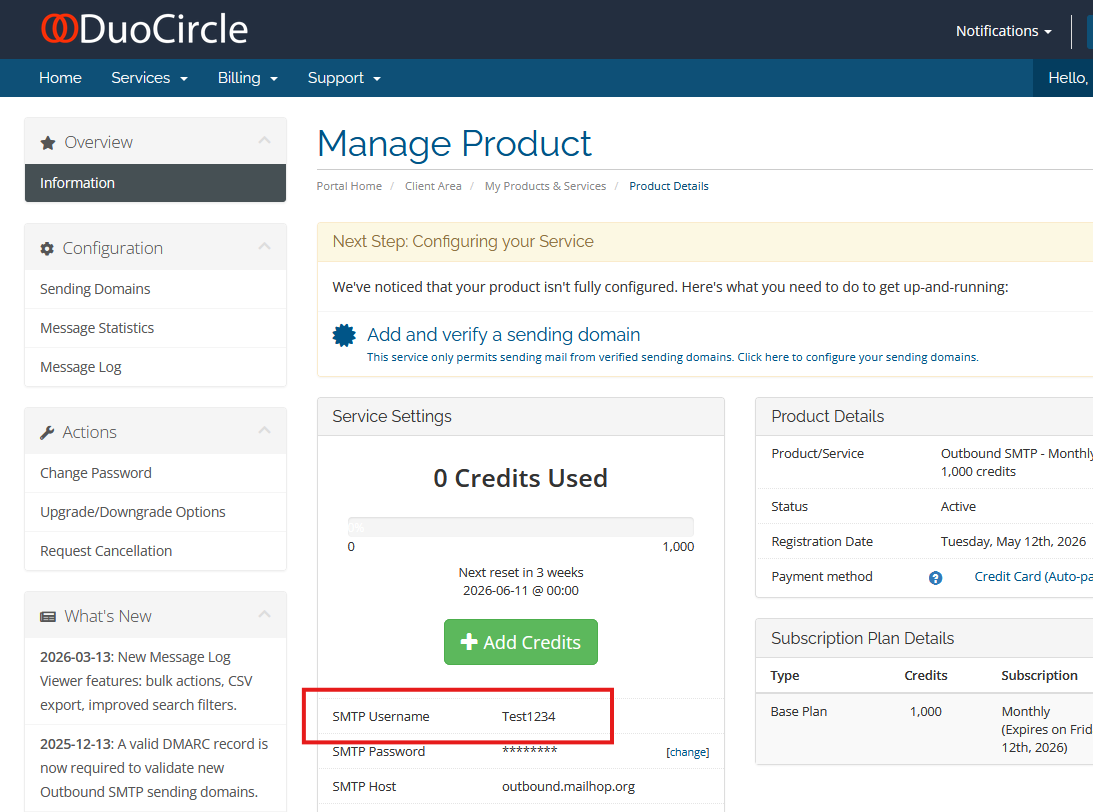
Username changes must be performed by a DuoCircle support technician on your behalf.
How to Request a Username Change
Contact DuoCircle support through any of the following channels:
- Email — Send your request to support@duocircle.com. Best if your change is not time-sensitive.
- Live Chat — Available on our support site for real-time assistance.
- Phone — Call our support line for immediate service.
Important: Coordinate the Timing Carefully
This change takes effect immediately once our technician applies the update. Any application still using the old username after the change is made will fail to authenticate, which will interrupt mail delivery.
To avoid disruptions:
- Choose a low-traffic window — Schedule the change during a period when little or no mail is expected to flow through the service.
- Be available in real time — For the actual change, we recommend staying on the phone or live chat with the DuoCircle technician so you can update your application credentials immediately after the change is made.
After the Change
Once your SMTP Username has been updated, you will need to update the credentials in every application, mail server, or device that authenticates with your Outbound SMTP service using the old username.