
Background CSV Export
CSV exports previously were limited to 10,000 records due to Elasticsearch's default query size cap. Exports now run in the background using the scroll API, removing this limit entirely. You can export result sets of any size — a progress bar tracks the export in real time, and the file is available for download once complete.
See Message Log Viewer - CSV Export for details.
Bulk Actions on All Results
Previously, bulk actions (retry, bounce, delete, release) could only be applied to messages selected on the current page. Now, after selecting all messages on a page, a banner offers a "Select all N results" option that applies the action to every message matching your current search — even across multiple pages. A confirmation modal shows the scope before executing. Bulk actions are capped at 25,000 messages per operation.
See Message Log Viewer - Bulk Actions for details.
Action History page expanded
The Action History page now shows active job badges on the toolbar button, so you can see at a glance if there are bulk action or export jobs running.
The page itself has been improved with better status display and progress information, as well as a separate tab to list recent CSV export requests and their status.
Date Range Picker now includes time component
The date range picker now includes a time component. You can specify exact start and end times (e.g., 2026-03-06 14:30:00) instead of only filtering by whole days. Shortcut buttons for common ranges (Today, Yesterday, Last 7 days, etc.) are still available. The end time defaults to end-of-day (23:59:59) when only a date is entered.
Delivery Path Information
The message preview now displays detailed delivery path information:
- Delivery IP — the outbound IP address used to deliver the message
- Destination MX — the destination mail exchanger hostname
- Destination IP and Port — the resolved destination server address
These fields appear in both the Last Delivery Attempt section and the Delivery History section of the message preview.
Copy buttons are provided for easy copying of IP addresses and hostnames.
The same fields are also available as columns in CSV exports and as search filters (Delivery IP, Destination MX, Destination IP).
Substring Matching for "Contains" Filter
The contains filter operator now performs true substring matching. Previously, it behaved like a word-boundary match, which could miss results when searching for partial strings within email addresses, hostnames, or status messages.
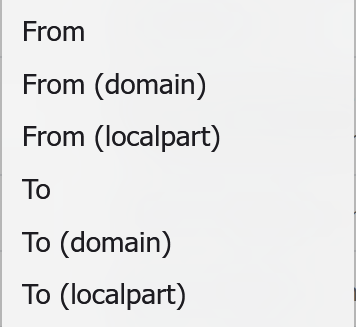
New Filters for Domain and Localpart matching
The "From" and "To" filters now have separate sub-options for matching specifically on the localpart (part before the @) or domain components of the address
"Is Releaseable" Filter
A new search filter, Is Releaseable, lets you filter the message list to show only messages that have an archived copy available for release. This is useful when working with quarantined messages to quickly identify which ones can be released.